

Hardware security key login for WordPress, with full login monitoring and attack blocking
Passwords get guessed, stolen and phished. Lock and Key Pro lets you and your users log in with a hardware security key such as a Ledger, YubiKey or Google Titan. There’s nothing for an attacker to steal and nothing for a fake login page to capture. Pro also shows every login attempt on your site, blocks attackers automatically, and alerts you by email when something needs your attention.
Why use a security key?
Phishing-proof. A security key only works on your real website, so fake login pages can’t trick it.
Nothing to steal. The secret never leaves the key. Even if your database leaked, nobody could log in with what’s stored there.
Fast. Enter your username, click Security Key, and confirm on your key. Done.
Password-free if you want. Turn off passwords completely for the accounts that matter most.
Everything in Pro
Security key login
A Security Key button on the WordPress login page and the WooCommerce My Account login.
Log in with your username or email address.
Works with any FIDO2 / U2F hardware key: Ledger (Nano S, S Plus, X, Stax), YubiKey, Google Titan, Feitian, SoloKeys and more.
Multiple keys per user, so everyone can keep a backup.
Works at both yoursite.com and www.yoursite.com.
Full server-side verification of every login, including cloned-key detection.
Control who uses keys
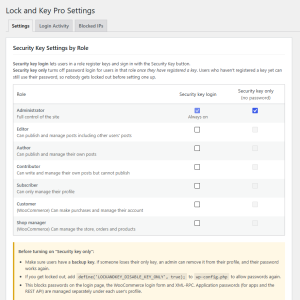
Choose which roles can use security keys: administrators, editors, authors, subscribers, shop managers, customers and custom roles.
“Security key only” mode for each role. Once a user registers a key, password login is switched off for them, on the login page, WooCommerce and XML-RPC.
Nobody gets locked out by accident. Users can still sign in with their password until they’ve registered a key.
Login Activity log
* Every login, failed login, blocked attempt and security key change in one place.
* Each entry shows the date, username, IP address, browser and method (password, security key or XML-RPC).
* Search by username or IP address, and filter by event type.
* Block a suspicious address in one click, straight from the log.
* Automatic cleanup after a number of days you choose.
IP address blocking
* Block single addresses or whole ranges, permanently or for 1 hour, 24 hours, 7 days or 30 days.
* Automatic blocking rules:
1. Administrator accounts: block an address after 3 failed logins on an admin account.
2. XML-RPC attacks: block bots after 3 failed XML-RPC logins, whatever username they try. This rule is on from the start.
3. All accounts: a general limit you set.
* Choose what blocked visitors see:
1. the standard “Access denied” message
2. your own message, with formatting and links
3. a page on your site
4. a separate message for automatically blocked attackers, or a custom message for any single address
* Block the login only, or the whole site.
* Turn off login through XML-RPC with one click.
Safe admin IP addresses and whitelist
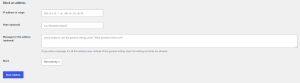
* Allow administrators to log in only from your own addresses, such as home and office. Admin logins from anywhere else are refused, even with the right password.
* Whitelist trusted addresses so they’re never blocked, with a one-click “Whitelist my current address” button.
* Lock-out protection built in:
1. you can’t block your own address
2. your address is added automatically when you turn on the safe admin list
3. emergency switches let you back in if you ever need them
Email notifications
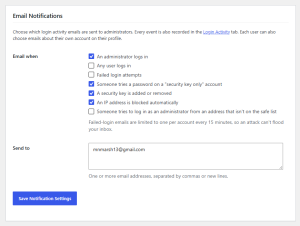
* For administrators: choose which events send an email.
1. an admin logs in
2. any user logs in
3. failed logins
4. a password tried on a key-only account
5. a key added or removed
6. an address blocked automatically
7. an admin login from an address that isn’t on your safe list
* For every user: each person picks alerts about their own account, such as “someone logged in to my account”.
* Flood protection: at most one failed-login email per account every 15 minutes.
WooCommerce
* The Security Key button on the My Account login form.
* Customers manage their keys under My Account → Account details.
* Customers return to My Account after logging in.
Built for real-world websites
* Works with caching plugins (W3 Total Cache, WP Rocket, LiteSpeed Cache) and object caches (Redis, Memcached).
* Works behind Cloudflare, load balancers and proxies, with protection against faked IP addresses.
* Plays well with other security plugins. Key logins go through WordPress’s own login process.
* Everything in one place: Settings, Login Activity and Blocked IPs on one tabbed page.
* Your data stays on your site. Lock and Key Pro doesn’t contact any outside service.
Lock and Key vs. Lock and Key Pro
Lock and Key (free)
Lock and Key Pro
Security key login (Ledger, YubiKey, any FIDO2 key)
Choose which roles use keys
“Security key only” (no passwords) per role
Dashboard warning for admins without a key
Works behind Cloudflare and proxies
Login Activity log with IP addresses
Manual and automatic IP blocking
3-strike blocking for admin accounts
XML-RPC attack blocking
Custom messages or pages for blocked visitors
Safe admin IP addresses and whitelist
Email alerts for admins and users
WooCommerce My Account integration
✓
✓
✓
✓
✓
✓
✓
✓
✓
✓
✓
✓
✓
✓
✓
✓
✓
✓
Already using the free Lock and Key? Your keys and settings carry over when you switch to Pro.
How it works
1. Install and activate Lock and Key Pro.
2. Register your key: go to Users → Profile → Security Keys, give your key a name, and confirm on the key.
3. Log in with it: enter your username or email, click Security Key, and confirm. Optionally turn off passwords for your admins.
Requirements
* WordPress 6.2 or newer
* PHP 7.4 or newer
* HTTPS. Browsers only allow security keys on secure sites.
* A FIDO2 or U2F hardware security key. On a Ledger, open the FIDO U2F / Security Key app.
Frequently asked questions
Where do I purchase a security key?
Purchase a Ledger Security key here.
Purchase a Google Titan Security Key here.
Purchase a YubiKey here.
Do I need a Ledger?
No. Any FIDO2 or U2F security key works, including YubiKey, Google Titan and others.
Can it access my crypto on my Ledger?
No. Lock and Key only uses the Ledger’s separate FIDO U2F / Security Key app. It never touches your wallet, your coins or your recovery phrase, and it never asks for them.
What if I lose my key?
Another administrator can remove the lost key from your profile, and your password works again. We recommend registering a backup key.
Will it slow my site down?
No. Lock and Key Pro only runs on login pages and its own settings screens.
Does it work with my other security plugin?
Yes. Key logins go through WordPress’s normal login process, so other security plugins keep working.
Is my data sent anywhere?
No. Keys, settings and the activity log stay in your own WordPress database. If you use the activity log, mention it in your privacy policy, because it records IP addresses.
Ledger, YubiKey and Google Titan are trademarks of their respective owners. Lock and Key is not affiliated with or endorsed by them.